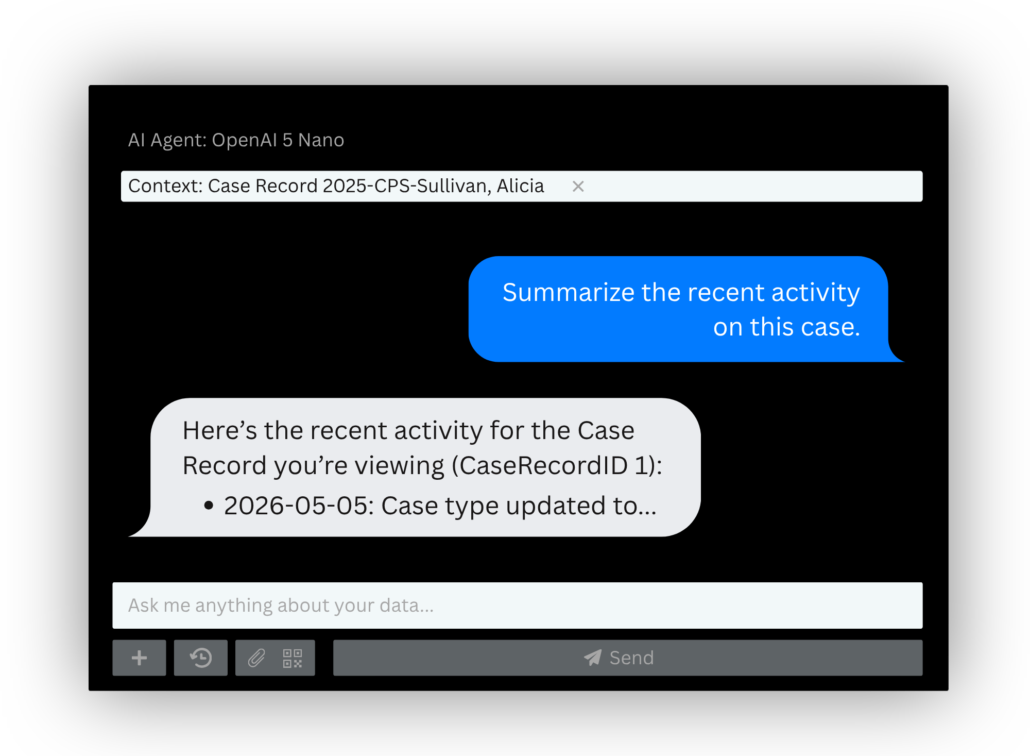
RiteTrack Assistant brings AI-powered assistance directly into RiteTrack, giving users a more natural way to find information, work with their data, complete everyday tasks, and get help when they need it.
Traditional software often requires users to know where to go to find the information they need. RiteTrack Assistant creates another option: start by asking the question. Because RiteTrack Assistant works within the logged-in user’s existing RiteTrack permissions, it can help users access and work with information they are already authorized to see.
Ask RiteTrack
Ask questions about information available within RiteTrack using everyday language instead of always navigating through individual records or reports.Make More of Your Data
Explore information, summarize activity, identify patterns, and ask follow-up questions to better understand the data your organization is already collecting.Get Help With Everyday Work
Use RiteTrack Assistant to explain information, summarize content, brainstorm ideas, draft or rewrite text, organize thoughts, answer questions, or think through a task.Connect With Your RiteTrack Team
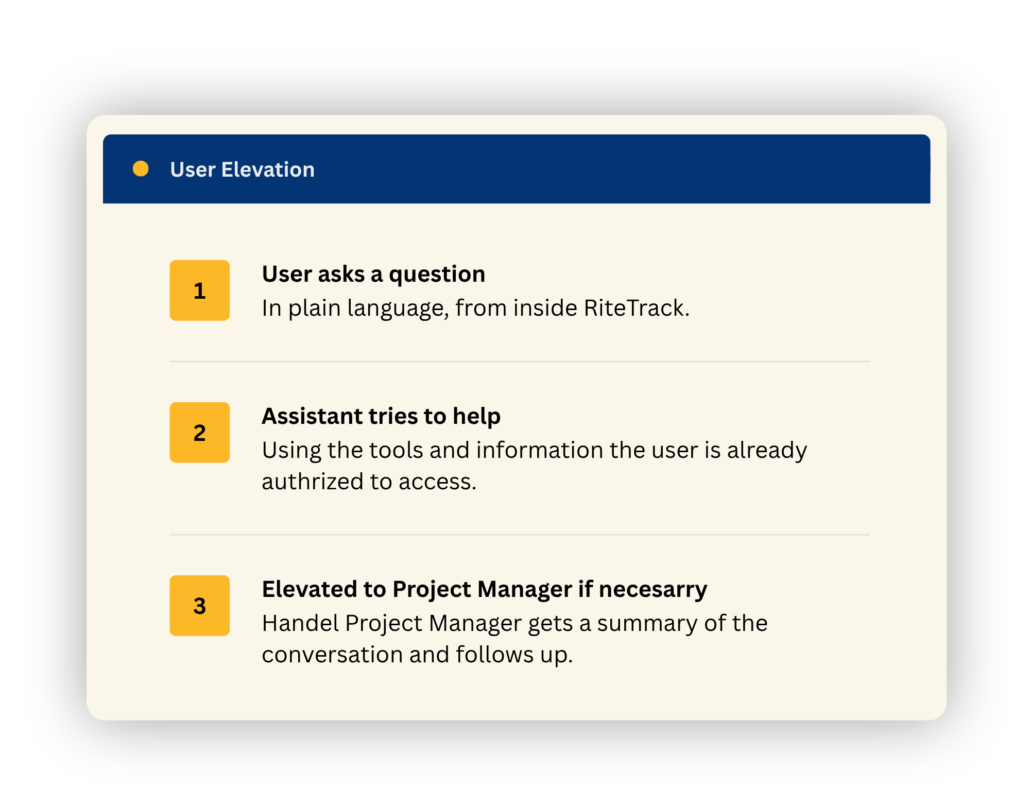
RiteTrack Assistant isn't intended to replace your relationship with the Handel team. When it can't adequately resolve a RiteTrack-specific question, it can help escalate the conversation to your RiteTrack Project Manager so the right person can follow up.Some questions require customer-specific knowledge, configuration changes, technical troubleshooting, development work, or human judgment. That’s why RiteTrack Assistant includes a User Elevation function. If the Assistant cannot adequately answer a RiteTrack-specific question, the conversation can be escalated to the customer’s Project Manager. The Project Manager receives a summary of the conversation so they have context and can follow up appropriately. RiteTrack Assistant provides another way to get help—not another layer between your organization and the people who support your system.
Organizations need to understand how AI interacts with their information before deciding whether it’s right for them. RiteTrack Assistant operates within each user’s existing RiteTrack permissions, so it can only return records, reports, help documentation, audit information, and other information that user is already authorized to access.
Access to RiteTrack Assistant can be assigned by security group using RiteTrack’s existing role-based security, so you can enable it for every user or limit it to administrators and designated groups. And because every message sent to and received from the AI model is logged within RiteTrack, you have a full audit history of Assistant interactions to review.
Frequently Asked Questions
How is RiteTrack Assistant different from other AI engines?
The primary difference is RiteTrack Assistant’s connection to RiteTrack. It can work with information the user is authorized to access, retrieve information through defined RiteTrack tools, help users navigate the system and complete work, and connect them with their RiteTrack Project Manager when additional support is needed.
Can RiteTrack Assistant access everything in our system?
No. RiteTrack Assistant follows the logged-in user’s existing RiteTrack roles and permissions. It can only access records, reports, help documentation, audit information, and other information that user is already authorized to access.
Can RiteTrack Assistant change information in RiteTrack?
RiteTrack Assistant can help prepare certain actions, but the user remains involved before information is saved. For example, the Assistant can navigate a user to a create or edit screen and pre-fill values, but the user reviews the information and clicks Save.
What happens if RiteTrack Assistant can’t answer my question?
If RiteTrack Assistant cannot adequately answer a RiteTrack-specific question, its User Elevation function can escalate the conversation to the customer’s RiteTrack Project Manager. The Project Manager receives a summary of the conversation so they have context and can follow up appropriately.
Does information leave RiteTrack when using RiteTrack Assistant?
With the standard OpenAI-based configuration, yes. Information needed to process an AI request is transmitted outside of the RiteTrack environment to OpenAI for processing. The exact information transmitted depends on what RiteTrack Assistant needs to fulfill the request. This does not mean the customer’s entire RiteTrack database is sent to OpenAI.
What about Tribal data sovereignty?
Organizations should evaluate RiteTrack Assistant based on their own privacy, security, and data sovereignty requirements. With the standard OpenAI configuration, information submitted for AI processing leaves the customer’s RiteTrack environment and is processed using external OpenAI infrastructure.
RiteTrack Assistant is an optional add-on, allowing each organization to determine whether the technology and its data-handling model are appropriate for its policies and requirements.
Is RiteTrack Assistant HIPAA/PHI compliant?
Yes. RiteTrack Assistant is available with an OpenAI configuration approved for HIPAA-compliant use, including workflows that may involve protected health information (PHI). This configuration allows PHI to be processed through RiteTrack Assistant in accordance with applicable HIPAA requirements.
HIPAA compliance is only one part of evaluating an AI solution, however. Organizations should still consider the sensitivity of the information they maintain, their own privacy and security policies, data-handling requirements, and—where applicable—Tribal data sovereignty requirements when determining how RiteTrack Assistant should be used within their organization.
Is RiteTrack Assistant included with RiteTrack?
No. RiteTrack Assistant is an add-on product. Customers will also incur model/token usage costs.
Is RiteTrack Assistant Right for Your Organization?
AI policies, privacy requirements, security expectations, and data sovereignty considerations differ from one organization to another.
RiteTrack Assistant is an optional add-on, not a required component of RiteTrack. Our team can walk you through how the Assistant works, how information is processed, available access controls, and deployment considerations so your organization can determine whether it is an appropriate fit.
Curious How RiteTrack Assistant Works?
Tell us a bit about your program and we’ll follow up to walk through how it works, what it costs, and whether it’s a fit.