

Case Management, Workflow Automation, Reporting Dashboards, Mobile Access, Security

















If you missed the live webcast, click here for a recording that looks at the specific intake and risk assessment functionality available in the RiteTrack juvenile justice system.
Every size of facility from 10 beds to 100 or more beds must follow the same first step when a youth arrives: completing an intake process.
Many facilities also require some type of risk assessment as part of this process.
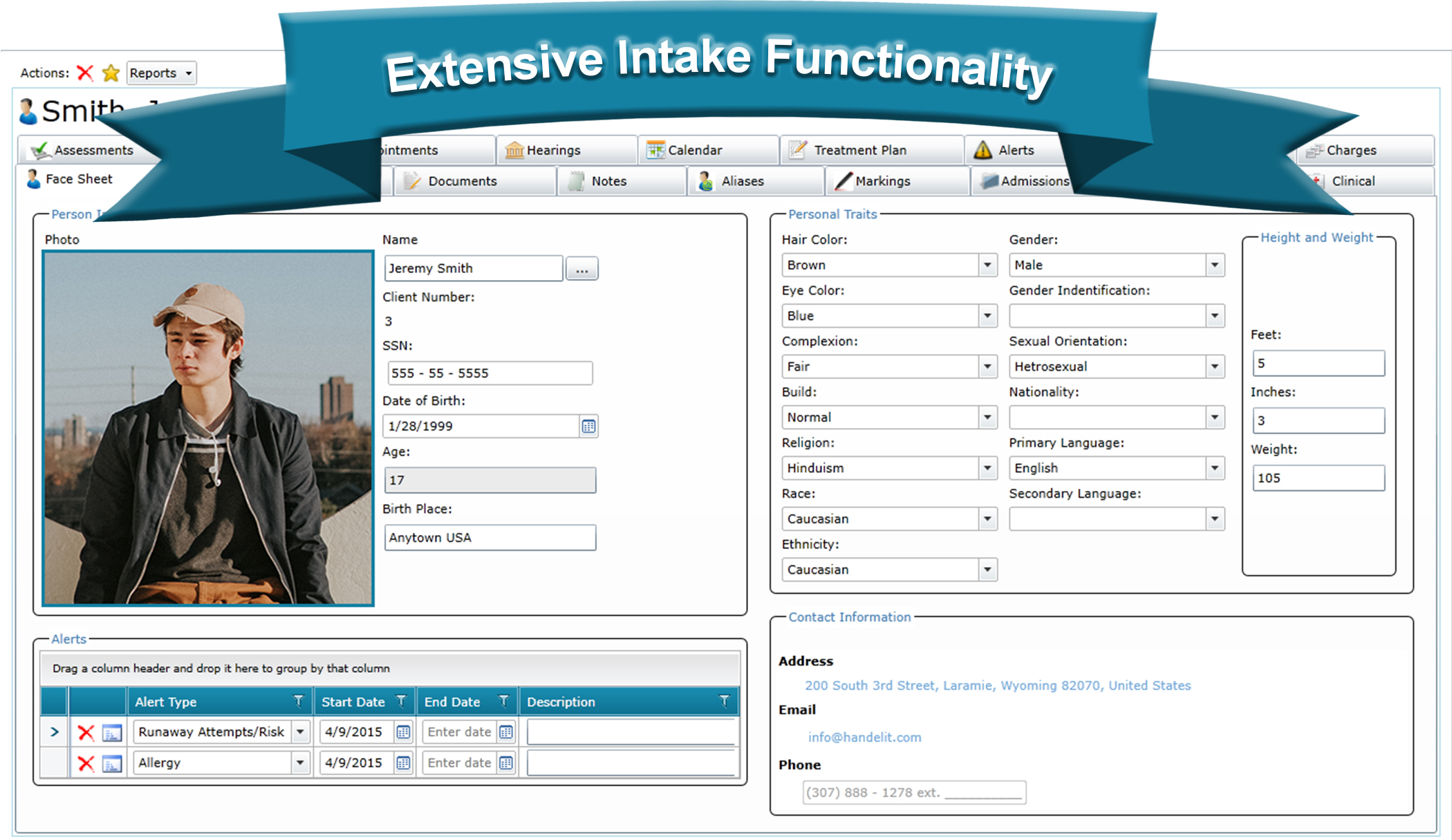
During this recording–showcasing a system which was designed with the needs of juvenile facilities at its heart–you will see the functionality that assists juvenile organizations with intake processes no matter the size or caseload.
If intakes and risk assessments have incorrect information or are incomplete, it complicates the admission process creating extra work for staff and administrators alike.
The extensibility of the system enables organizations to complete risk assessments within the software’s interface and can generate an easily digestible summary of the assessment data.
We covered the following items:
An information and case management system such as this ensures data is accurately entered, easily accessible, and simply reported on.
 If you were unable to attend the recent webinar on how RiteTrack is used for data generation in juvenile justice programs and system-of-care programs, you can now view that recording here.
During this webcast, Steve discussed the challenges facilities and system-of-care programs face when trying to generate reliable data to inform stakeholders of trends, issues, and successes.
He examined software that provides the day-to-day operations of a facility and showed real-world examples of how to utilize juvenile-specific data to improve decision about the youth in care and the operations of the facility.
Reports illustrated include:
You can also see best practices to use the data to inform decision-making by:


RiteTrack facilitates easy navigation through hyperlinks.
In our age of technology and communication it is common that our customers are adopting RiteTrack after using another data management system, often for a substantial amount of time. One of the largest concerns that we deal with is, “Will we get to keep our data and will it be complete?” At Handel, we understand that historical information is invaluable to spot trends, maintain reporting requirements, and increase interdepartmental communication. That is why we have developed proprietary software to quickly and accurately convert legacy data into RiteTrack.
Our data conversion process starts at the very beginning of our project management process; Handel views data conversions as a key and central part of our software implementations, not as an afterthought. Our trained project managers begin by explicitly mapping out each column in every table in the legacy database and define a place for it to go in the new RiteTrack system. This process takes place alongside the creation of the system design so that the mapping is completed before we start developing the system in order to make certain that no crucial data is left behind. During this process your project manager will highlight areas where the legacy data may not be clean or accurate so that no dirty information finds its way into the new system.
While on the initial site visit, your project manager will sit down with you and your staff to walk through your legacy system to gain a full understanding of its functionality, how your staff uses it, and any potential difficulties that may arise in the conversion process. Since every system is different we make sure to take the time to get to know it. This practice gets to the core of how Handel does business; each project and each customer is unique and we dedicate ourselves to forming a relationship based upon communication, transparency, and honesty.
Once a conversion map has been completed and approved, the data will begin the process of being moved into RiteTrack. Our skilled developers have built software to assist us in the conversion process. Using this single core technology reduces errors, speeds up the conversion process, and lowers cost. Our data conversion experts work side-by-side with our project managers throughout the entire project to make sure that this process is as streamlined as possible.
Much like our software development, our data conversion process involves multiple rounds of testing and validating to make sure that the end product is exactly what it should be. You and your staff will be able to see and test the converted data in a sandbox version of RiteTrack, this will even include any custom fields that have been added. For larger systems this is often done in phases to ensure that nothing is missed in the sheer volume of information we work with.

Handel’s Conversion Process (Click to Enlarge)
We have utilized this process on databases of all sizes, from a few thousand rows of data up to millions of rows. To gain a more complete understanding of how our data conversions fit into the entire software implementation process please read Problem Solved: A Story of Vanquishing Risk and Complexity.
Finally, when the entire data conversion has been tested and approved, Handel will pull a final and current copy of the legacy database for conversion. This information will be what eventually comprises your initial RiteTrack system. At the end of this process your users will have a new, friendly, and easy-to-use software solution complete with all of the data that has been tirelessly entered by users in the legacy system.
This simple, yet powerful, methodology, when paired with our proprietary software, takes the often frustrating and error-prone process of converting data and turns it into an efficient and organized procedure. What is more, our data conversions are fully supported just like our software. If there is an issue found after RiteTrack has gone live our data conversion experts will rectify the error, often with zero downtime for users. Our philosophy for data conversions is the same as it is for building software; we center everything on our clients and their needs in our pursuit for the best product possible.
I was told growing up that when you experience success you should act like you’ve experienced it before. Don’t flaunt your touchdown reception or first place finish; act like you’ve been there before. However, I quickly realized that there is a huge difference between simply acting like one has done something and actually having done it.
So, what does this all have to do with software implementations and case management? The simple answer is that there is a large collection of companies out there that claim to be able to take on massive projects to design, develop, and implement a large enterprise-level software solution. How should project leaders with large and complex projects choose a vendor from the plethora of options available to them?
Most people know that in enterprise-level software implementations, risk is proportionally tied to the complexity of the project. If the complexity goes up the risk does as well. With that in mind, what are we to think of projects on the extreme end of complexity? What if we are taking multiple legacy systems and want to put them into one single and comprehensive system? What if we also want to bring multiple departments together onto one single system in that same project? What if there are federal and state reports that must justify from the moment the system goes live? What if we need to integrate with other systems at the same time that everything else is happening? If risk of failure is directly proportional to the complexity of a project, should we even bother attempting such bold initiatives?

Click to Expand
The answer to that final question is a resounding ‘yes’. It is worth pursuing because of the benefits that it can lead to. Bringing multiple systems together reduces complexity and duplication of data entry which, in turn, reduces errors. Having multiple departments or facilities operate on one common platform increases communication and improves outcomes for clients. The risk, in other words, is worth the potential rewards that a system that can do all of those things could bring. However, that one question still lingers… What if it fails?
This is where proven success comes into play. It is not enough to know that a company could potentially complete a project. These projects need a company that has been there before. The type of system described above with multiple data conversions, bringing previously disparate departments together on one system, reporting to federal and state agencies accurately from day one, and integrating with other software systems describes most of Handel’s customers. We have proven success on every single one of our solutions, from unifying government agencies of a Tribe to providing a system that unifies detention and residential facilities for a county.
Large and complex projects require the devoted attention of software professionals who have repeated success and a strong, standard solution. We have devoted countless hours to designing, testing, and refining each of our solutions to meet the needs of our clients with our standard functionality, whether it is for a CPS Department, Juvenile Detention Facility, TANF Department, or a multitude of other systems. This standard functionality not only brings down cost, it also lessens risk.
While most systems require small changes, we have found that our standard platform will accomplish most of the needed functionality within the markets that we serve. Completely custom solutions that are built from the ground up may sound wonderful at the beginning of a project. However, these projects are the most likely to end up over budget, behind schedule, and outside of scope. We at Handel know this because that is how we used to build software solutions. We built our latest version of RiteTrack to combat all of those things; we provide a common framework to all of our customers, thoroughly test and refine each one of our software modules, and send updates to all of our systems whenever we make something better or fix the rare bug we run into. This means that not only is your project more likely to be successful on the front end, but also that our customers never have to worry about having a system that nobody knows how to fix or update five or ten years down the road.
And what of those things that will always be custom to an individual software solution? We handle (yes, pun is intended here) data conversions, systems integration, custom reporting, attaching custom modules to our standard framework, training and system documentation, and everything else imaginable on a regular basis. All of our staff, from our sales personnel to our project management staff to our software developers, are trained to create custom alterations and additions to make our software work for you in the most optimal way possible.

This combination of our standard software offering and our staff’s familiarity with providing insightful and accurate consulting creates a unique environment where we can reduce the risks imposed by time, cost, and scope of a project as a whole while also building a software solution that keeps your legacy data, communicates with other systems, and improves upon your organization’s reporting abilities. Handel’s ability to accomplish all of these extremely complex things comes from our more than 17 years of corporate experience and our tireless efforts to make the best standard software for each industry we serve. Our experience and work makes it possible for organizations to dream big about what their case management software can do for them.
Though these types of projects are large, complex, and sometimes even scary, Handel can help mitigate all of that. We have been there before and our customers have experienced great success using our system. Our track record shows that our methodologies, standard software offerings, and innovative technologies work. So, go ahead and dream big and know that if Handel is your partner your project, no matter how big, will be a success.
Whether a facility is secure or unsecure, detention center or residential home, being able to quickly and intelligently assign a resident to a room is something that every organization needs to be able to do. RiteTrack not only is able to create a virtual model of your facility’s layout, it also offers users an interface to manage room assignments with ease.
RiteTrack displays a facility’s layout in a tree that is able to be customized to suit each facility’s needs. Sections of this tree can quickly be expanded and collapsed to increase the speed at which users can navigate through the various areas of a facility. RiteTrack provides counts of the number of vacancies for each area and rooms are displayed in different colors to identify them as vacant, not vacant, or closed. Please see the Building Your Custom Facility Layout blog entry for an in-depth discussion of customized room layouts and how it can benefit your facility.
The example shown below displays a resident who has had two separate room assignments during his stay at our demonstration facility. To display the power of RiteTrack’s Room Assignment Module, we are going to temporarily move this resident to a new room, keep his current room assignment open to make sure that his room is not accidentally assigned to another resident, and then close out his temporary room assignment.
As seen below, our example resident, Ben, is assigned to Room 103 in Living Unit 100. However, a co-defendant of Ben’s needs to be housed in that Living Unit during a court hearing and Ben must be moved to another unit. We don’t want to evict Ben from his room, just temporarily move him. This will keep his room from accidentally getting assigned to another resident while he is temporarily placed in another area of the facility.

Click to Enlarge
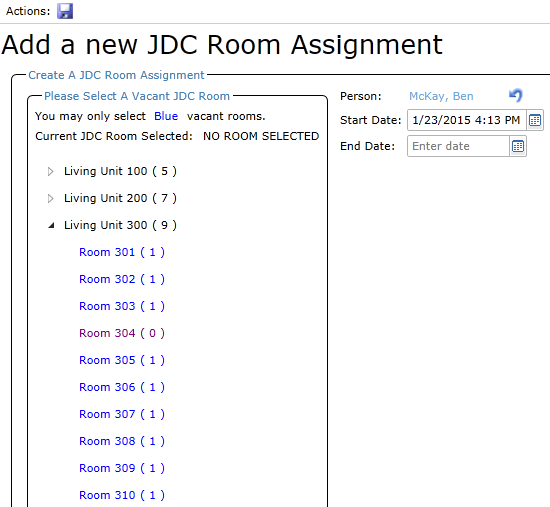
A simple click of the Green Plus Sign button will add a record and navigate us to our Room Assignment Tree. By clicking on the arrow next to Living Unit 300 we can quickly see what rooms are available in that area of the facility.
Click to Enlarge
As can be seen at a quick glance, there are 10 rooms in Living Unit 300, only one of which is currently occupied. RiteTrack automatically populated the current date and time into the Start Date for the new room assignment to assist in speeding up data entry. This date, however, may be changed if the information needs to be back dated. All the user must do to complete the new room assignment is click the save icon and the room assignment is added to the previous list of entries for this resident.
Click to Enlarge
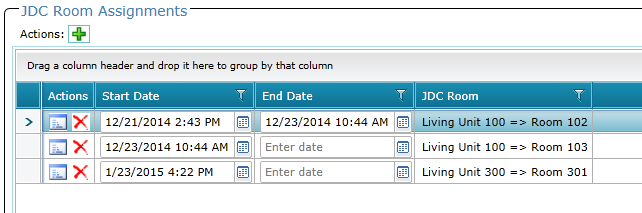
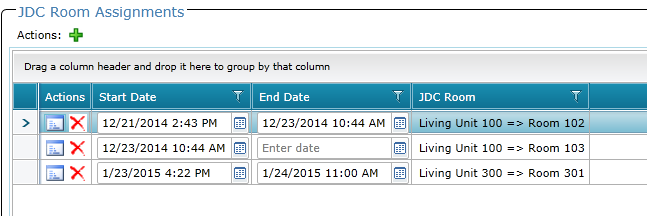
Notice, this resident currently has two open room assignments. The new room assignment information will be reflected automatically on RiteTrack’s reports and the original room assignment will be preserved. Once our temporary room assignment is completed, all we need do is enter an End Date for Ben’s temporary room assignment in Living Unit 300 and Room 301 will become available again for another resident.
Click to Enlarge
RiteTrack provides flexible data entry to users in an environment that is fast and intuitive to use, yet maintains the strict data integrity that is required by juvenile facilities. Handel designed RiteTrack with the philosophy that the tasks that must be done every day by users should be made easier, not more difficult, by the software that they use. We designed the Room Assignment Module around that philosophy. Ask for a demo today to see just how easy and intuitive it is.
In our more than a decade-and-a-half of experience in the juvenile justice field, we have found many, many pieces of our software can be used with no modification whatsoever for every facility we work with. However, there is one piece that always seems to require customization. Each facility has its own unique layout and its own individual room configuration. As anybody who has worked on a software implementation can attest to, customization means an increase in scope and cost.
If each facility requires a custom room assignment module in its facility management software and custom software development leads to higher costs then the inevitable conclusion has been that this type of software is either expensive or impossible to obtain. So, the question for any organization historically has been which do you sacrifice? Your budget… or your software functionality?
Fortunately, at Handel we strive to provide standard solutions in order to reduce the cost of our product and the ever present risk of scope creep. We have worked to develop a system that is flexible enough to adapt to any facility, big or small, yet retain enough standard functionality to maintain the rigid standards required by juvenile justice facilities.
We have accomplished this with our innovative Facility Layout Management Tool. Below is an example facility that is split into separate living units.

Click to Enlarge
Each facility starts with its own “Base Building Unit”. Whether your facility is separated into pods, living units, wings, or buildings Ritetrack can take that verbiage and begin a virtual construction of your facility. Each of these Base Building Units may then be broken down into sub-units.

Click to Enlarge
In this example, Living Units are broken down into Rooms. However, your facility may use different terminology. As with the Base Building Units, sub-units may also be altered at the click of a button to match the existing terminology used in your current facility. In turn, each sub-unit may itself be broken down into more granular units if needed.
Additionally, different areas of a facility may have different layout configurations. For example, a standard living unit may be broken into separate wings while a supervision or medical unit may consist of a single area with beds. RiteTrack’s innovative functionality can build out these distinct layouts with no additional customization.
This flexible yet elegant design allows another powerful piece of functionality for users of the system. At a glance a RiteTrack user can see exactly what vacancies exist in the facility. In the second image Living Unit 100 is displayed with 8 rooms, each of which can hold one resident. Rooms displayed in blue are vacant and thus have one vacancy. Rooms displayed in purple currently have a resident assigned to them and thus have no vacancy in this example. Rooms displayed in black are closed rooms and are not able to house a resident. As we can see, at a quick glance, there are six vacant rooms in Living Unit 100, one room is occupied, and the last is closed and not able to house a resident. This logic is maintained for the entire facility layout and, as seen in the first image, can be scanned quickly by a RiteTrack user.
RiteTrack can utilize your current terminology, construct your facility in a virtual environment, and provide an overview of room vacancies at a quick glance. This is just the tip of the iceberg of room assignment functionality; there simply is too much to cover in one article. Future blog posts will cover how to assign rooms, how to close rooms to occupancy, and even manage multiple room assignments for a resident.
There is, however, one more piece of good news for organizations making the upgrade to RiteTrack. The Project Management and Development staff at Handel will oversee the virtual construction of your facility as part of our standard deployment process. This layout will be tested, verified, and users will be trained extensively in its functionality prior to the launch of your solution. From the very first moment of use your RiteTrack system will deliver this powerful functionality to your users.
Nobody wants to make the choice between blowing a budget and sacrificing quality. RiteTrack offers a way to avoid that dilemma. Ask to see a demonstration of our Facility Management software today.