

AFCARS, ICWA, Financial Services, 477, General Reporting


Watch this recording of the Managing JDAI Standards and Reporting webcast.
Many juvenile justice communities strive to comply with JDAI standards but struggle with the required JDAI data collection.
During this webinar, we examined how RiteTrack increases your facility’s capabilities to measure, track and report on its JDAI efforts. We will also review how JDAI communities can utilize such a system to analyze data and formulate questions related to JDAI information. This comprehensive system provides the framework needed to help any facility adhere to evolving JDAI standards.
The secret lies in documenting and tracking this in the daily case management functions. RiteTrack’s JDAI reporting produces comprehensive reports for race, gender, age, and geography, as well as other requirements including daily population counts, quarterly reports, etc. Additionally, it compiles the required JDAI reporting in real time and eliminates a separate method of JDAI data collection.
Key features from the system that were demonstrated included:
RiteTrack’s sophisticated web-based interface and industry-best security model ensures only the right people have access to appropriate and relevant information from any location. Including JDAI compliance, standards and reporting.
So, whether you are running a county detention facility or a JDAI community, you should take a look at this offering because RiteTrack supports an emphasis on treatment and rehabilitation, along with resident and facility management.
If you didn’t have a chance to catch the webcast live, you can register to view a recording here.
In today’s world we have more data available to than ever before. Yet, few organizations truly understand how to harness this data and turn it into information and knowledge. During this webcast, we will define and explore how data analytics transforms data into meaningful information. We will also examine how Continuous Quality Improvement (CQI) can be applied to inform and improve services for families and children.
We examined the increase in the amount of data being stored over the last decades and the trajectory of the rise of data in our lives today. Even with data all around us it may not be collected accurately or in a consistent manner. Analytics and CQI depend upon quality data, and it is essential that leadership supports the collection and use of data with a sense of purpose and a vision of goals and benchmarks to measure. We will discuss reporting and information systems which may be used to collect data, as well as other sources of information available from Federal and State governments.
So how can Tribes make use of this practical information?

Using analytics changes this abundance of data into digestible information that can be used for many meaningful purposes. Comparative spreadsheets with raw data are one of the simplest ways of modeling data. Taking raw data and creating charts and graphs to provide useful visual methods of viewing and analyzing data and can be achieved with commonly used programs.
During this part of the process is where you create descriptive information using the data, then predictive intelligence, which leads to prescriptive knowledge that can be used to inform decisions and changes to improve services and outcomes. The philosophy of Continuous Quality Improvement (CQI) can be used to both ensure that data is accurately and consistently collected and as a method to analyze and react to the data. We will review in detail the cycle of CQI.
Register to watch here and email or call us with any questions.
Often one of the most frustrating experiences a user of enterprise software can have is the inability to track address information in a consistent and reliable way. This arises mostly due to the fact that most software systems don’t verify address information, which leaves the formatting of an address up to each individual user. This “free form” system of entering data can seem to make a system more flexible, but in reality it creates a large amount of unusable data.
To provide an illustration, below are some examples of the issues that we have run into in our data conversions when organizations upgrade to RiteTrack:
All of these issues lead to one common problem; addresses in most databases cannot be readily trusted to be accurate. During data conversions from legacy systems to RiteTrack, we often identify that up to 50% of addresses that were entered into an outdated system are incomplete, inaccurate, or not even an address. Luckily, there is one common solution to solve this problem. That answer is address verification.
RiteTrack utilizes the power of Google Maps to verify addresses, help complete missing information, and keep consistent formatting in the addresses that users track. This single solution, using Google’s API, leads to more accurate reporting, reduced data entry time, and, most importantly, a database that can be trusted.
What is more, by using Google Maps, RiteTrack also can provide all of the advanced functionality that users have come to expect from technology in other areas of their lives. If a person’s personal cell phone can provide them directions to their destination, then surely an enterprise software solution should be able to. Sadly, most systems don’t. When we developed RiteTrack we set out to change that. Below are a series of screenshots to show how easy it is to use our advanced address functionality to provide an unprecedented user experience.
Even with a poorly formatted address, as seen below, RiteTrack is able to make suggestions about the addresses that closely match a search.

Using the incomplete and poorly formatted address above, RiteTrack identifies potential addresses that have been verified as actually existing.
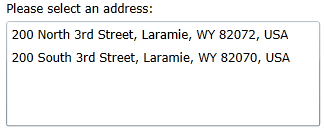
With a single click of a button a user can select the correct address, which will also be correctly formatted automatically for users. The data validation that was once was impossible in older systems takes two clicks in RiteTrack.
What is more, with a single click RiteTrack can access a Google Maps search of the address in a separate browser tab and users instantly have access to the power and functionality of Google’s software. No retyping the address; no copy and paste; it just works.

By being able to access Google Maps from inside of RiteTrack, users can not only view a map and a street view of a location, but can also get directions there, export those directions to their smart phones and other devices, or use any of Google’s other functionality. The power that users have come to expect from their personal devices can now also be brought to their offices. Handel believes that if your smart phone can do it, your enterprise software should as well.