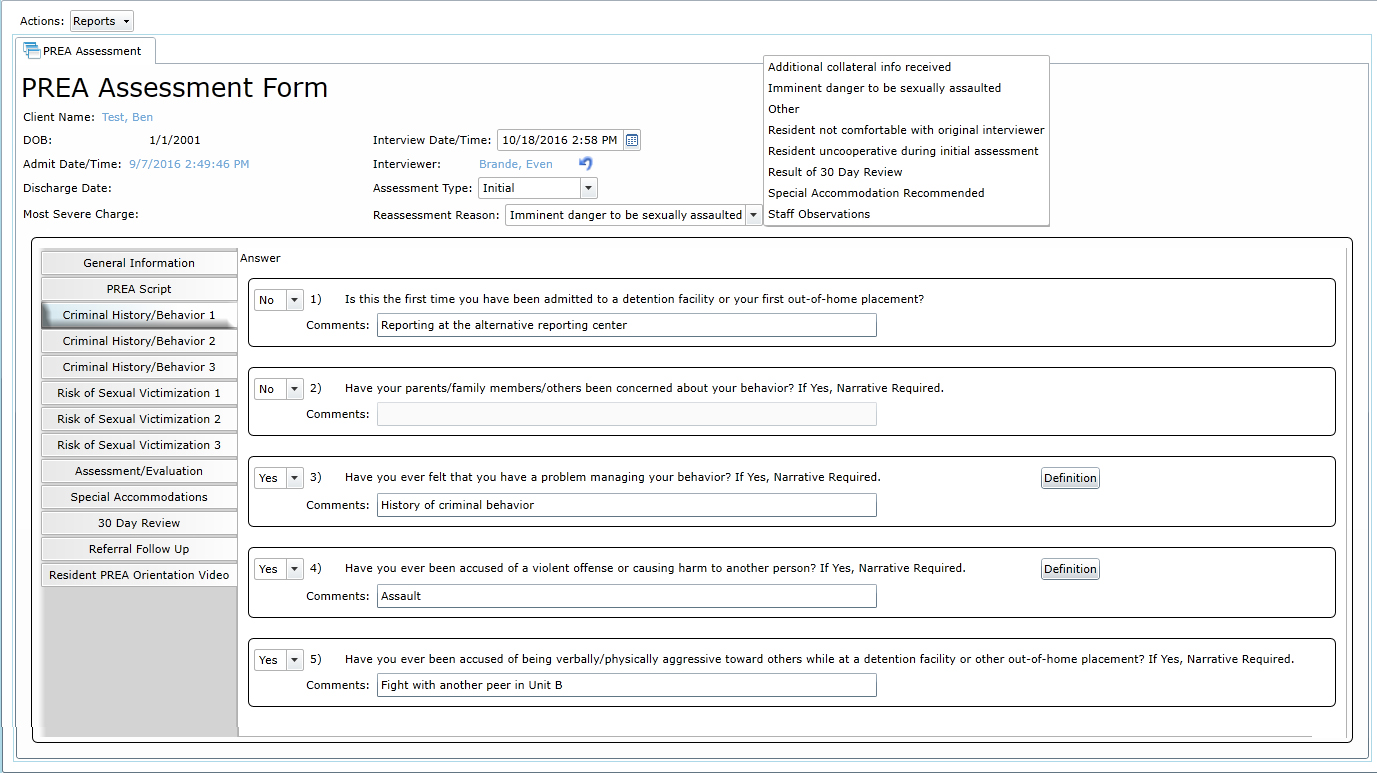







The Prison Rape Elimination Act (PREA) passed in 2003 was to provide for the research and analysis of the incidents of prison rape. While this is focused mostly on the adult corrections system, PREA also is monitored in juvenile detention facilities as well.
Handel has worked closely with our customers to build implementations for juvenile facilities to manage the complexities of PREA standards. Whether your facility is beginning to incorporate these tracking standards or is overwhelmed by the intricacies or find they have become burdensome, register to watch this recording exploring a RiteTrack implementation that incorporated PREA seamlessly.
PREA standards require the use of risk assessments, PREA-related questions (e.g., sexual orientation, gender identification, etc.), agency documentation, and reporting to reach the outlined goals in the initiative.

During this recording, we will demonstrate those features in RiteTrack plus the following:
Handel has implemented RiteTrack software in numerous juvenile facilities, juvenile detention and juvenile treatment facilities. Register and watch this recording to see how RiteTrack assists facilities in the day-to-day operations as well as incorporating required PREA standards.

Juvenile facilities across the country have opted to work with Performance-based Standards to assist with monitoring confinement conditions in treatment services and residential facilities using national standards and performance outcomes.
PbS is a data-driven improvement model grounded in research that holds juvenile justice agencies, facilities and residential care providers to the highest standards for operations, programs and services.

Twice a year juvenile facilities compile data from day-to-day case management (including incident reports) and enter it into the PbS program interface. The PbS system then analyzes the data to assess whether the facility is meeting performance outcomes and uses this data to create summary reports. These analyses are used to create improvement plans and direct needed reforms in a facility.
Often during the months of April and October, many facilities who partner with PbS for this valuable service struggle with the time it takes for staff to perform daily responsibilities and reenter collected data into the PbS system.

However, in 2017 Handel met PbS at the Michigan Juvenile Detention Association (MJDA) Conference. Both of us saw the potential of a partnership between our two organizations. Over the next few months, we created a RiteTrack module that enables the PbS analysis system to integrate directly with RiteTrack’s case management and reporting solution which eliminates the duplicate data entry staff had to complete for the required reporting periods.

This RiteTrack and PbS integration enables juvenile detention and juvenile justice organizations’ staff to enter daily documentation into one case management system, RiteTrack—which also produces user friendly and reporting for other facility needs—while the integration module imports the required information directly into PbS’s system for the bi-annual reporting periods.
RiteTrack’s juvenile justice module captures required information like incident reports for PbS reporting. Because of the aligned data capture in the systems, information documented in RiteTrack is submitted to PbS through the one-of-a-kind integration module and eliminates duplicate data entry—saving detention staff and administration valuable time.
Contact us if you would like more information on the PbS and RiteTrack integration module or RiteTrack’s solution for juvenile justice and detention facilities.
If you missed the live webcast, click here for a recording that looks at the specific intake and risk assessment functionality available in the RiteTrack juvenile justice system.
Every size of facility from 10 beds to 100 or more beds must follow the same first step when a youth arrives: completing an intake process.
Many facilities also require some type of risk assessment as part of this process.
During this recording–showcasing a system which was designed with the needs of juvenile facilities at its heart–you will see the functionality that assists juvenile organizations with intake processes no matter the size or caseload.
If intakes and risk assessments have incorrect information or are incomplete, it complicates the admission process creating extra work for staff and administrators alike.
The extensibility of the system enables organizations to complete risk assessments within the software’s interface and can generate an easily digestible summary of the assessment data.
We covered the following items:
An information and case management system such as this ensures data is accurately entered, easily accessible, and simply reported on.
When reviewing DMC aspects, in my mind I kept coming back to the issue of how much needs to be encompassed when implementing and maintaining DMC standards into a juvenile justice program. These standards incorporate assessments, evaluation, and monitoring of juveniles in care. However, DMC doesn’t only apply to youth in detention. It really incorporates all areas of youth contact within the juvenile justice continuum of care.

Example of statistical report with DMC data.
Often DMC communities may have an alternative reporting center within it. I’m curious to see how information is communicated between one part in the juvenile justice continuum of care with another part. There is the potential for an enormous amount of time to be spent creating policies that address information sharing parameters, managing confidential information, and memorandums of understanding between these organizations. Even though data points like race, ethnicity, gender, geography, and offenses seem straightforward, these would likely need to be clearly defined with consensus from members of the continuum of care.
So how can organizations or programs in the juvenile justice continuum of care address information challenges like these? Using a web-based software like RiteTrack as the single-point-of-entry tool provides the framework from which programs can support the youth and the stakeholders.

Risk Assessment tool in the solution.
For a community to address DMC, there has to be involvement from shareholders in the community. There has to be planning and agreement on issues. Organizations must develop intervention that involves programming. Agencies need to evaluate whether the agreed upon plan is working. Finally, programs must be monitored to make sure that identified problems area continued to be addressed. Within all of these steps, the most important area may be the collection of data because youth data is pervasive in all these steps. RiteTrack collects data that occurs throughout all point of the juvenile justice continuum from first point-of-contact, risk assessment, community involvement, and if needed detention. In addition to extensive documentation, RiteTrack quickly generates reports and statistical data based on real-time data that is accurate and reliable. Implementing RiteTrack into operations is not just a procurement or download of another piece of software. It is a partnership with Handel IT to enhance and improve communities, not only by supporting a continuum of care, but also by creating a central point-of-entry to provide the framework to address DMC issues.
To see my most recent webcast reviewing DMC functionality and reporting in RiteTrack, click here and register to watch the recording.


RiteTrack facilitates easy navigation through hyperlinks.
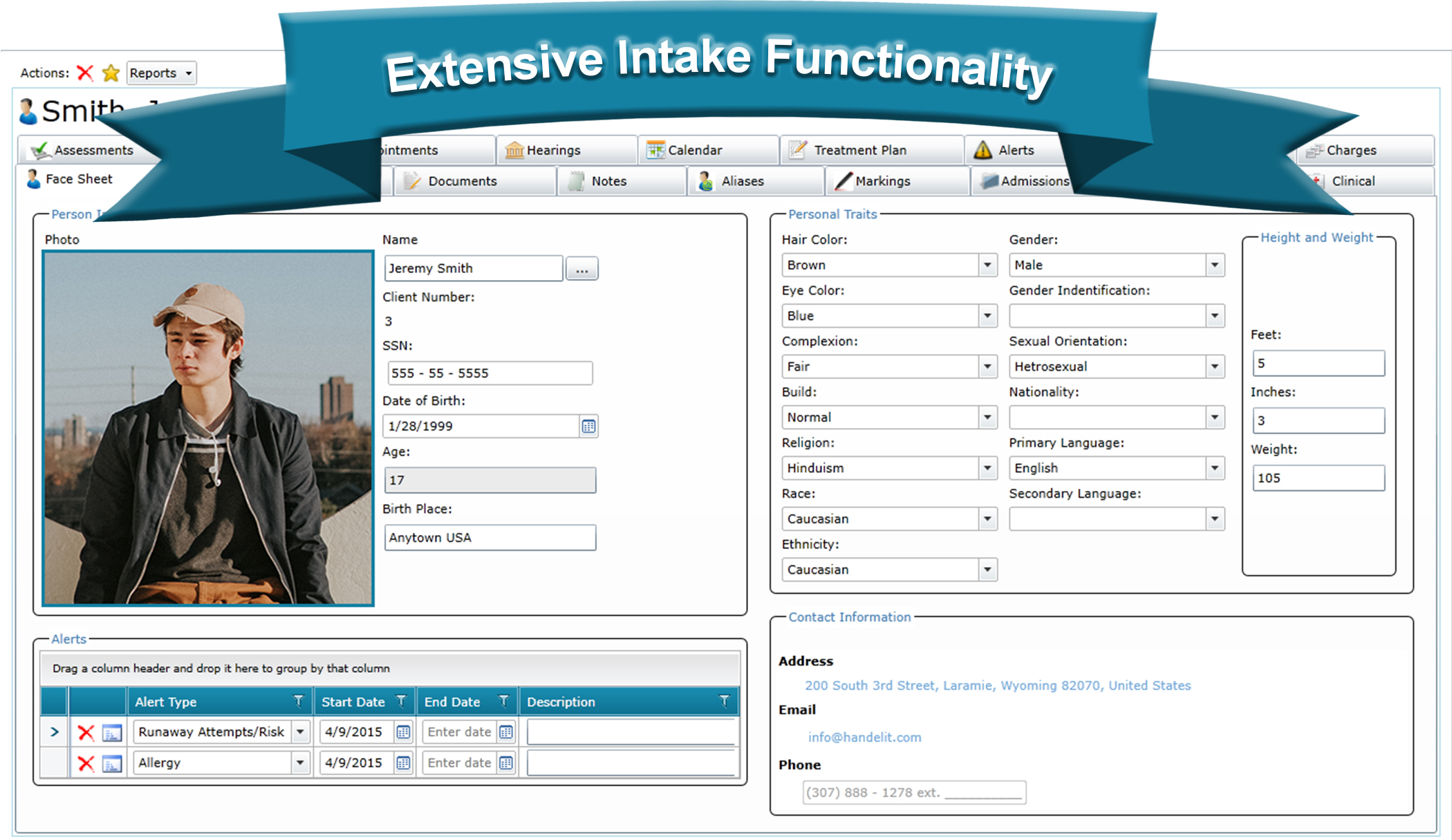
One of the core focus areas of the Prison Rape Elimination Act (PREA) is the concept that each individual deserves to be protected and that one of the best ways to ensure that is through data collection and management. Handel has built RiteTrack to go beyond simply checking a box to designate a person as a female or male. Included as standard in our juvenile justice software is the ability to track not just a person’s actual gender, but also what they personally identify as and their sexual orientation. All of this information is tracked right on the Face Sheet of a resident in RiteTrack.
PREA requires special protections for intersex and transgender youth in a detention environment. Handel has taken this to heart and has designed, as standard product, functionality to track these data points.
There are instances where the labels of female or male simply do not encapsulate the reality of each individual resident. PREA recognized this and has set new requirements for working with intersex residents. RiteTrack has been built to scale to each facility’s unique requirements for tracking the gender of each resident. Below is an example dropdown list with three selection options; female, intersex, and male.

The above image is just to provide an example list of gender options. Each facility may custom design this dropdown list to suit their individual needs with as many options as they desire. What is more, if a facility needs to add an additional option in the future an administrator of the system may add the option through RiteTrack’s Admin Dashboard. The average time it takes to do this is under 30 seconds. This means that RiteTrack users can access very powerful functionality, with high degrees of flexibility, with no system down time.

PREA defines transgender as, “A person whose gender identity is different from the person’s assigned gender at birth.” While tracking gender is, and will always be, a necessary requirement for juvenile facilities, that physical gender may not be how the resident personally views him or herself. In order to meet this new requirement, RiteTrack has built out additional functionality to track gender identification separately from a person’s physical gender at birth.
Much like the Gender dropdown box, the Gender Identification list may be altered by a facility to encapsulate as many options as is desired. This list can potentially get quite expansive; Facebook currently has 56 gender options. While a juvenile facility may never need to track that many options RiteTrack has been built to scale to that many, just in case.

While tracking sexual orientation is not an explicit requirement in PREA, RiteTrack has been built with the philosophy that we don’t stop at just the minimum requirements. In working with juvenile facilities and other juvenile justice departments we have found that a person’s sexual orientation can have a great impact on how the juvenile interacts with other residents, interacts with staff, and experiences their stay at detention or residential facilities. This dropdown box works exactly like the two discussed previously; the list may be custom managed, added to at any time, and provide the flexibility that each facility deserves to have.
While tracking data points is a great concept and a requirement that must be fulfilled, Handel believes that what we can then do with that data is much more important. Once users have access to a system that goes beyond check boxes that can only track if a resident is a female or a male and they are given the additional power of having more comprehensive gender choices, the ability to track how a person identifies him or herself, and the option to track sexual orientation we can begin to leverage that information to lead to better outcomes and track legislative requirements in a more robust manner.
Examples of this include PREA’s requirements to limit cross gender searches and viewings and to only allow trained staff the ability to search intersex and transgender youth. Once we track these three data points, it is then possible to build immensely powerful business logic off of those pieces of information and we can begin to, as an example, reduce the incidence of disallowed searches. Additionally, those fields can be paired with other modules in RiteTrack, such as Treatment Planning to be able to provide analytics on how gender, gender identification, and sexual orientation can play into that process.
Data can be powerful. Talk to a Handel Sales Representative or Project Manager today about how we can make your data work for you.
To learn more about the PREA requirements discussed in this post please go to the PREA webpage for Juvenile Facility Standards.
Whether a facility is secure or unsecure, detention center or residential home, being able to quickly and intelligently assign a resident to a room is something that every organization needs to be able to do. RiteTrack not only is able to create a virtual model of your facility’s layout, it also offers users an interface to manage room assignments with ease.
RiteTrack displays a facility’s layout in a tree that is able to be customized to suit each facility’s needs. Sections of this tree can quickly be expanded and collapsed to increase the speed at which users can navigate through the various areas of a facility. RiteTrack provides counts of the number of vacancies for each area and rooms are displayed in different colors to identify them as vacant, not vacant, or closed. Please see the Building Your Custom Facility Layout blog entry for an in-depth discussion of customized room layouts and how it can benefit your facility.
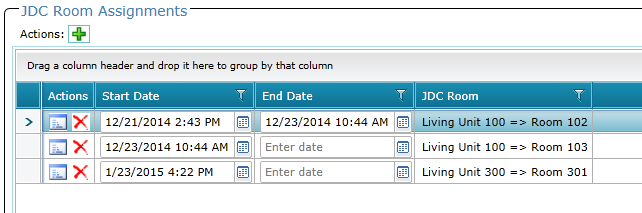
The example shown below displays a resident who has had two separate room assignments during his stay at our demonstration facility. To display the power of RiteTrack’s Room Assignment Module, we are going to temporarily move this resident to a new room, keep his current room assignment open to make sure that his room is not accidentally assigned to another resident, and then close out his temporary room assignment.
As seen below, our example resident, Ben, is assigned to Room 103 in Living Unit 100. However, a co-defendant of Ben’s needs to be housed in that Living Unit during a court hearing and Ben must be moved to another unit. We don’t want to evict Ben from his room, just temporarily move him. This will keep his room from accidentally getting assigned to another resident while he is temporarily placed in another area of the facility.

Click to Enlarge
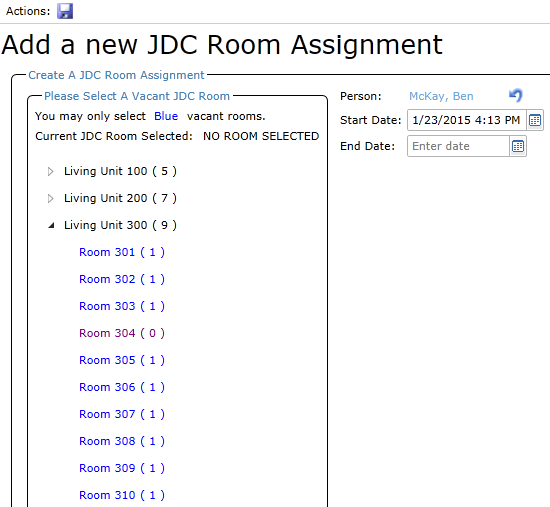
A simple click of the Green Plus Sign button will add a record and navigate us to our Room Assignment Tree. By clicking on the arrow next to Living Unit 300 we can quickly see what rooms are available in that area of the facility.
Click to Enlarge
As can be seen at a quick glance, there are 10 rooms in Living Unit 300, only one of which is currently occupied. RiteTrack automatically populated the current date and time into the Start Date for the new room assignment to assist in speeding up data entry. This date, however, may be changed if the information needs to be back dated. All the user must do to complete the new room assignment is click the save icon and the room assignment is added to the previous list of entries for this resident.
Click to Enlarge
Notice, this resident currently has two open room assignments. The new room assignment information will be reflected automatically on RiteTrack’s reports and the original room assignment will be preserved. Once our temporary room assignment is completed, all we need do is enter an End Date for Ben’s temporary room assignment in Living Unit 300 and Room 301 will become available again for another resident.
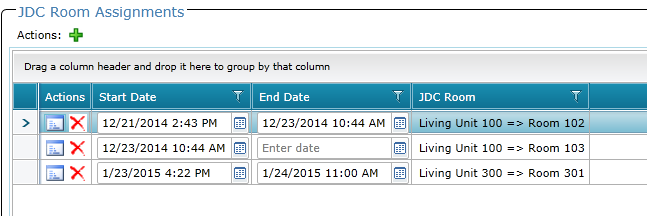
Click to Enlarge
RiteTrack provides flexible data entry to users in an environment that is fast and intuitive to use, yet maintains the strict data integrity that is required by juvenile facilities. Handel designed RiteTrack with the philosophy that the tasks that must be done every day by users should be made easier, not more difficult, by the software that they use. We designed the Room Assignment Module around that philosophy. Ask for a demo today to see just how easy and intuitive it is.
Included, as standard functionality, in all RiteTrack Juvenile Justice Facility Management systems is the newly upgraded Visitation Module. This module not only tracks when a resident has a visit or a call from a friend or family member, it will also help prevent unapproved calls or visits from happening. RiteTrack provides this advanced functionality by first mandating that an individual receive approval prior to a visitation or call event. All requests for approval to call and visit are stored in a single location on every admission account to provide a single view for staff members to be able to add, update, and view information for that record. Consolidating this information is intended not only to save time and increase productivity, but also to make it easy for users to quickly determine whether an individual is allowed to have contact with a resident to prevent unapproved visits. Below is a view of our Visitation Approval screen.

Click to Enlarge
The example above displays a resident who has had two individuals request approval to visit or call during their admission. In addition to tracking names and approval statuses, RiteTrack also tracks the duration of the approval, as well as a comments section to provide users with additional information or alerts about potential visitors or callers. As seen above, Ben, our example resident, only has one person who is allowed to call. RiteTrack uses this information in the Calls screen to filter only those people who are allowed to call the resident.

Click to Enlarge
The functionality of Visitation Module is to help users screen calls and only allow approved callers to have contact with the resident. Only one caller has the approval to talk to the resident so only that person’s name is able to be selected from the dropdown menu. This functionality is designed to add one additional level of security for contact with a resident. Likewise, all visits a resident receives are tracked ona separate screen. Our example resident has no current approved visitors. As expected, this means that no name is selectable in the dropdown list to help users easily identify that a visit should not be allowed.

Click to Enlarge
However, if a visitor has been approved and that information needs to updated, RiteTrack accomplishes the change in a matter of seconds. All a user must do is approve the correct person, as seen below.

Click to Enlarge
And then the visitation record may be added.

Click to Enlarge
RiteTrack provides advanced functionality without creating a large additional workload for users. Many systems have sacrificed either functionality or ease of use to accomplish the other. Handel has provided a way to achieve both. Users provide above and beyond service for their residents; Handel believes facility management software should provide above and beyond service for users.
Often one of the most frustrating experiences a user of enterprise software can have is the inability to track address information in a consistent and reliable way. This arises mostly due to the fact that most software systems don’t verify address information, which leaves the formatting of an address up to each individual user. This “free form” system of entering data can seem to make a system more flexible, but in reality it creates a large amount of unusable data.
To provide an illustration, below are some examples of the issues that we have run into in our data conversions when organizations upgrade to RiteTrack:
All of these issues lead to one common problem; addresses in most databases cannot be readily trusted to be accurate. During data conversions from legacy systems to RiteTrack, we often identify that up to 50% of addresses that were entered into an outdated system are incomplete, inaccurate, or not even an address. Luckily, there is one common solution to solve this problem. That answer is address verification.
RiteTrack utilizes the power of Google Maps to verify addresses, help complete missing information, and keep consistent formatting in the addresses that users track. This single solution, using Google’s API, leads to more accurate reporting, reduced data entry time, and, most importantly, a database that can be trusted.
What is more, by using Google Maps, RiteTrack also can provide all of the advanced functionality that users have come to expect from technology in other areas of their lives. If a person’s personal cell phone can provide them directions to their destination, then surely an enterprise software solution should be able to. Sadly, most systems don’t. When we developed RiteTrack we set out to change that. Below are a series of screenshots to show how easy it is to use our advanced address functionality to provide an unprecedented user experience.
Even with a poorly formatted address, as seen below, RiteTrack is able to make suggestions about the addresses that closely match a search.

Using the incomplete and poorly formatted address above, RiteTrack identifies potential addresses that have been verified as actually existing.
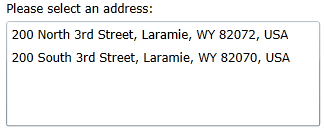
With a single click of a button a user can select the correct address, which will also be correctly formatted automatically for users. The data validation that was once was impossible in older systems takes two clicks in RiteTrack.
What is more, with a single click RiteTrack can access a Google Maps search of the address in a separate browser tab and users instantly have access to the power and functionality of Google’s software. No retyping the address; no copy and paste; it just works.
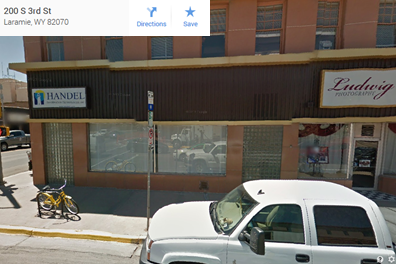
By being able to access Google Maps from inside of RiteTrack, users can not only view a map and a street view of a location, but can also get directions there, export those directions to their smart phones and other devices, or use any of Google’s other functionality. The power that users have come to expect from their personal devices can now also be brought to their offices. Handel believes that if your smart phone can do it, your enterprise software should as well.