
Inside the RiteTrack Admin Interface: Tools for Configuration, Security, and Control
By Casey Bader
One of the questions I am frequently asked when discussing RiteTrack is how much the system can be adapted to meet the unique needs of a Tribe or organization. My answer always begins by making an important distinction between configuration and customization.
While the two terms are often used interchangeably, they mean very different things in software implementation.
Configuration refers to personalizing the standard functionality already built into RiteTrack. This includes modifying forms, renaming fields, managing drop-down lists, reorganizing navigation menus, configuring reports, and defining business rules—all without changing the underlying application code.
Customization, on the other hand, involves adding entirely new functionality through database changes and software development. Although RiteTrack supports extensive customization, Handel Information Technologies has invested heavily in developing powerful administrative tools that minimize the need for custom programming.
The result is a configurable case management software system that can be tailored to each Tribe’s unique business processes while reducing implementation time, simplifying future upgrades, and lowering long-term costs.
A Powerful Administrative Interface
RiteTrack is designed to be almost infinitely configurable, as every configurable case management software should be. The RiteTrack Admin Interface gives organizations extensive control over how the application looks, behaves, and secures information.
These tools are used extensively during implementation as Handel works with each client to personalize RiteTrack to match their workflows and terminology. Once implementation is complete, those same tools remain available to designated RiteTrack Administrators and Power Users, allowing organizations to continue evolving the system as programs, policies, and reporting requirements change.
Beyond configuration, the Admin Interface also provides centralized access to user administration, security management, audit logs, report configuration, and data recovery tools that help organizations maintain the integrity of their information.
User Administration Made Simple
Managing user access is one of the most important responsibilities of a system administrator, and RiteTrack provides a secure and intuitive interface for doing so.
Administrators can quickly create new users, modify existing accounts, or deactivate users who no longer require access. When a new user is created, RiteTrack automatically sends an email invitation containing a secure link that allows the user to create their own password and log in for the first time.
Because passwords are created by the user, administrators never have access to them, providing an additional layer of security and helping organizations comply with security best practices.
Each user is assigned one or more Claims, which determine the security groups to which they belong. These Claims define exactly what a user can view, create, edit, or delete throughout the application—even down to individual fields on a form. This level of granular security helps ensure that confidential information is only available to authorized staff.
Administrators can also:
- Force password changes
- Add or remove security Claims
- Deactivate or reactivate user accounts
- Review each user’s most recent login date and time
This information makes it easy to monitor system usage and identify inactive accounts.
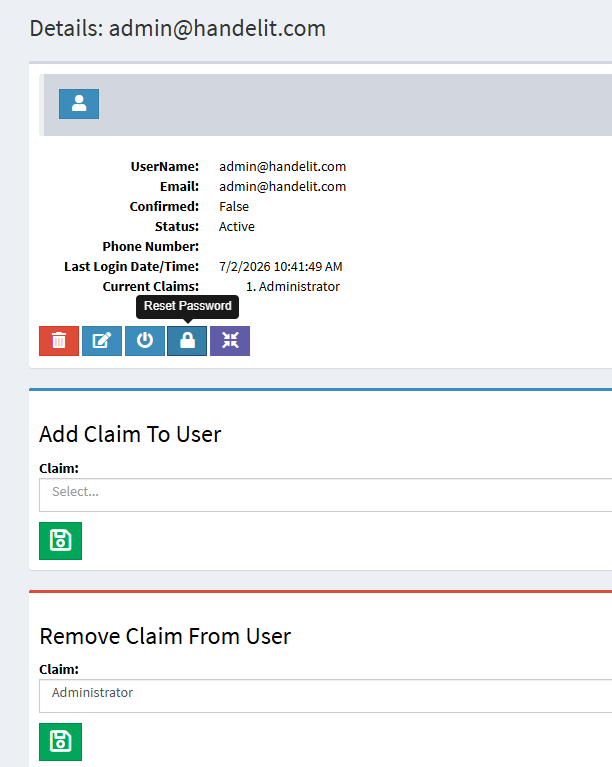
The Admin Interface provides access to RiteTrack User Administration.
Complete Transparency Through Audit Logs
Accountability is essential when managing sensitive information. Every action performed within RiteTrack’s configurable case management software is automatically recorded in the Audit Log.
Whether information is added, modified, or deleted, RiteTrack captures:
- User ID
- Date and time of the action
- Type of modification
- Object affected
- Previous and updated values
Audit Log reports are available throughout the standard application as well as within the Admin Interface. Administrators can search or filter the logs by user, date range, object type, or other criteria, making it easy to investigate questions, troubleshoot issues, or satisfy auditing and compliance requirements.
This complete history provides confidence that every change made within the system is fully traceable.
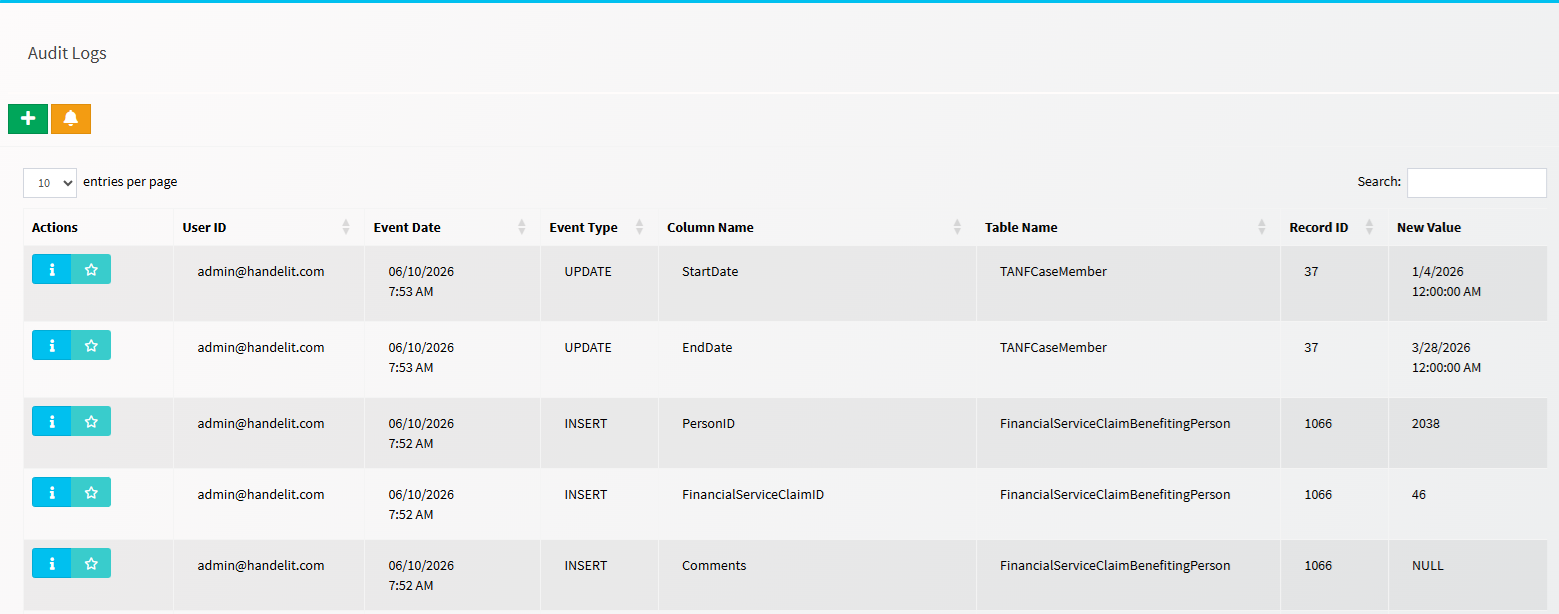
The Audit Log records all activity in RiteTrack including user, time, and information about the changes made.
Deleted Doesn’t Mean Lost
One feature that surprises many new RiteTrack users is that records are never truly deleted.
Instead of permanently removing information from the database, RiteTrack simply deactivates the record. To end users, the information appears to have been deleted, but the historical data remains safely stored.
This approach offers several important advantages.
Historical reporting remains accurate because past activities are preserved. Organizations can continue producing complete statistical reports without gaps in historical information. Even more importantly, records that were accidentally—or even intentionally—deleted can be restored.
Using the Recover Deleted tool, administrators can browse deleted records by object type or search for specific records and reactivate them when necessary. This greatly reduces the risk of permanent data loss while preserving a complete historical record.
Intelligent Configuration Through Type Management
One of the most powerful features of the Admin Interface is Type Management.
Many software applications simply allow administrators to edit the values that appear in drop-down lists. RiteTrack’s configurable case management software goes much further.
Simple Type Management allows administrators to modify the available values shown in drop-down menus throughout the application.
More advanced Type Management includes configurable tables that define the business intelligence behind those selections.
For example, within RiteTrack TANF, the Case History Type table determines what happens when a case status changes. Selecting a particular status can automatically trigger system actions such as:
- Opening an application
- Creating a new case
- Denying an application
- Closing an active case
- Establishing benefit start dates
- Ending participation for individuals on a case
Rather than requiring software developers to change business logic, authorized administrators can configure these intelligent workflows directly through the Admin Interface.
This flexibility allows RiteTrack to adapt to changing program requirements while maintaining consistent processes across the organization.
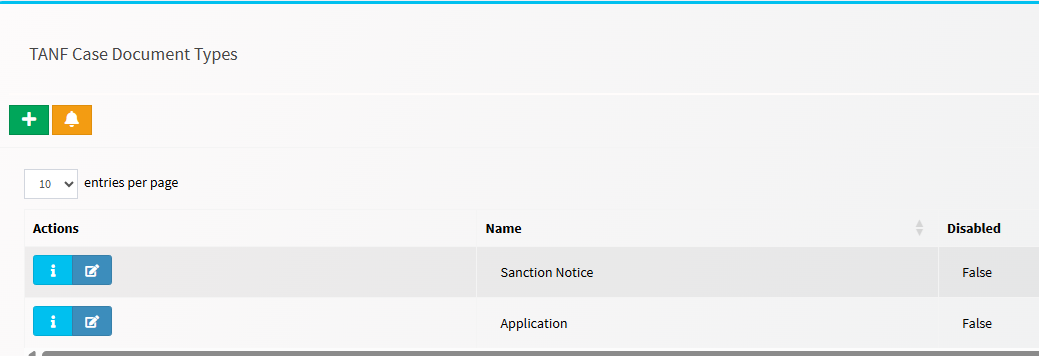
A simple type table where Admininstrators can add, edit, and disable values.
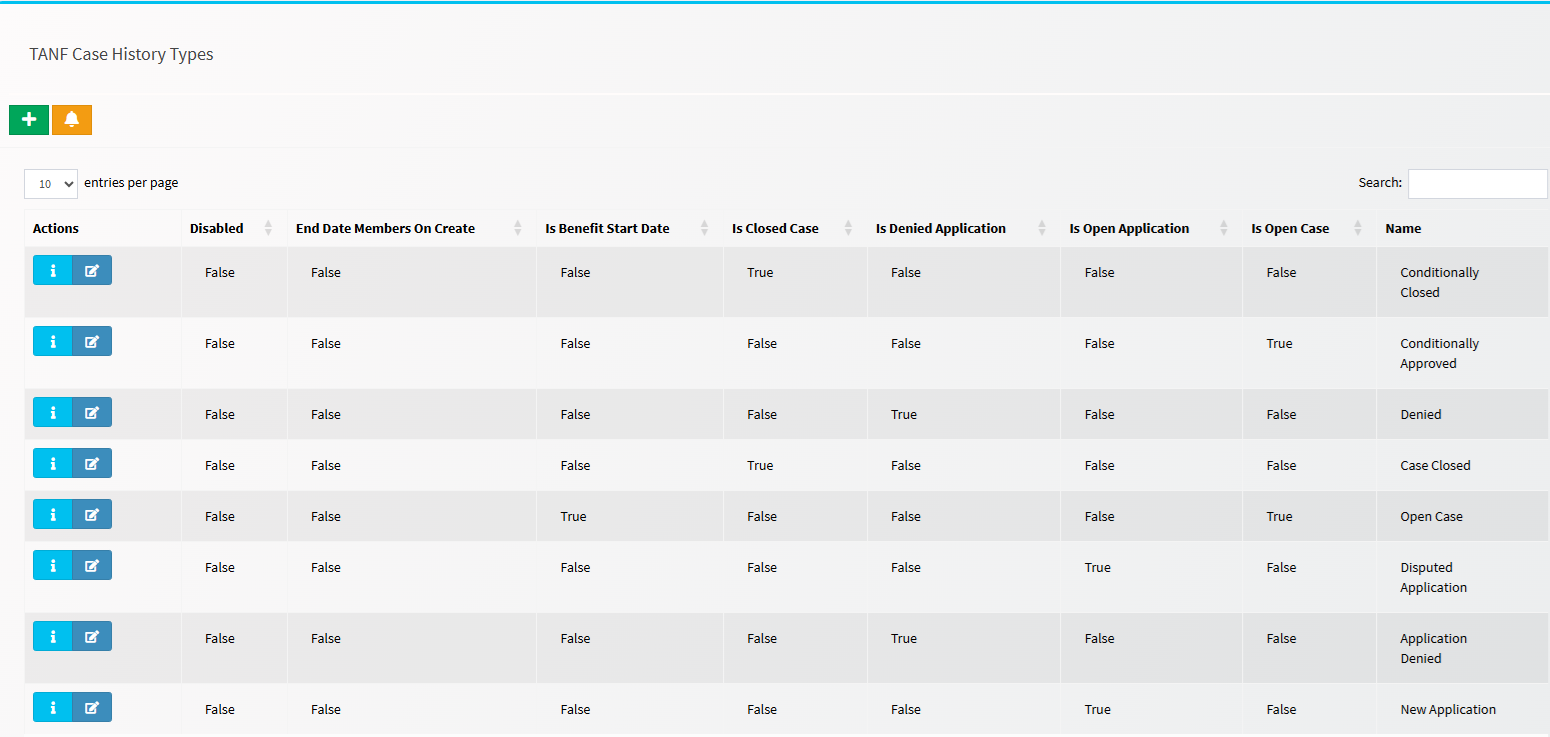
This detailed type table defines what actions are taken on persons, applications, and cases when a status is changed.
Flexible Report Configuration
Reporting is one of RiteTrack’s greatest strengths, and the Admin Interface provides extensive control over how reports are organized and accessed.
Administrators can:
- Rename reports
- Update report descriptions
- Specify where reports appear throughout the application
- Define report parameters
- Assign security permissions
Reports may be available globally or only within specific objects such as a person, case, provider, or service record.
Report parameters allow users to filter and analyze information based on dates, programs, locations, funding sources, workers, or other criteria, helping organizations quickly answer operational and management questions.
Access to each report is also secured through Claims, ensuring users only see reports appropriate for their responsibilities.
Personalize Navigation and Forms
Every organization works differently, and software should reflect those differences.
The RiteTrack Admin Interface includes intuitive drag-and-drop tools that allow administrators to personalize both navigation and screen layouts.
The Link Order Editor allows navigation items to be reorganized so that the most frequently used functions appear exactly where staff expect to find them. Instead of accepting a default alphabetical list, organizations can group features according to their own workflow and business processes.
Likewise, the Layout Editor enables administrators to rearrange fields on forms using the same drag-and-drop approach. Important fields can be moved to the top of a screen, related information can be grouped together, and layouts can be optimized to improve efficiency for staff.
These configuration capabilities apply not only to standard RiteTrack functionality but also to custom-developed features, providing a consistent experience across the entire application.
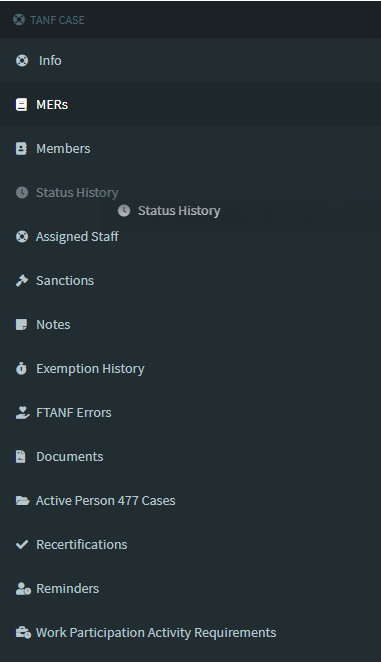
The Link Order Editor provides the ability to reorganize items in the navigation tree.
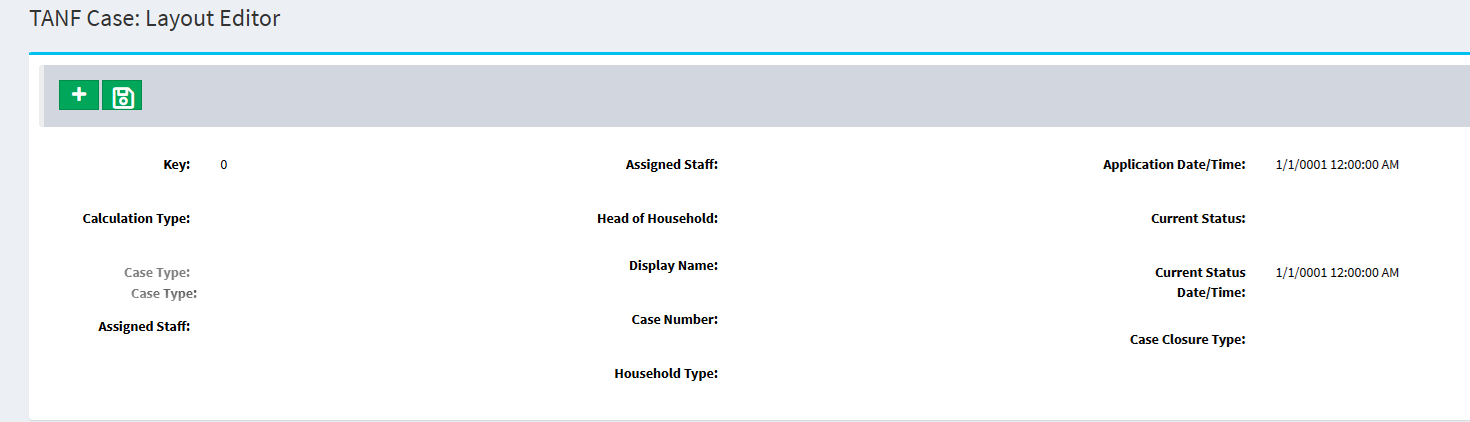
The fields on any form in RiteTrack can be configured via a drag-and-drop interface.
A System That Evolves With Your Organization
No two Tribal governments or organizations operate exactly alike. Policies change, programs expand, funding requirements evolve, and reporting expectations continue to grow.
The RiteTrack Admin Interface was designed with this reality in mind.
By giving administrators the ability to configure users, security, reports, navigation, layouts, business rules, and workflow behavior without requiring software development, RiteTrack’s configurable case management software becomes a system that evolves alongside your organization.
Reducing unnecessary customization also means faster implementations, simpler software upgrades, lower maintenance costs, and greater independence for your staff.
Ultimately, configuration empowers organizations to take ownership of their system while ensuring RiteTrack continues to reflect their unique processes and reporting requirements for years to come.
If you’re interested in learning how RiteTrack can be configured to match your organization’s workflows, data collection needs, and reporting requirements, contact Handel Information Technologies today. We’d be happy to demonstrate how RiteTrack can become a system that truly works the way you do.